Windows 11 Weather App Raises Questions After RAM Usage Tops 1 GB
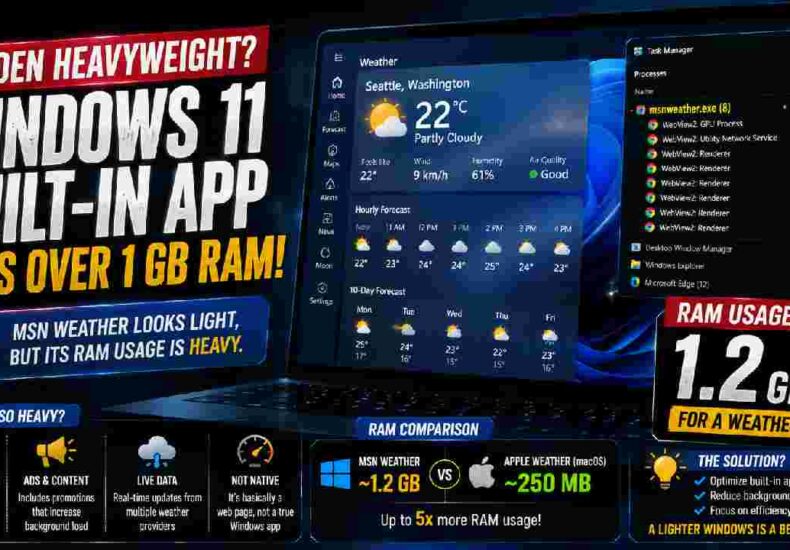
Fundacion Rapala – The Windows 11 Weather app has sparked fresh discussion after testing showed surprisingly high memory consumption. According to the information reported, MSN Weather can consume around 1.2 GB of RAM while displaying everyday forecasts. That figure feels significant for an application designed mainly to show temperatures, rain forecasts, wind conditions, and other weather information. The concern becomes more noticeable on affordable laptops with only 8 GB of RAM. On those machines, every background process can affect the overall experience. Still, MSN Weather offers more than a simple forecast. It includes live radar, hourly precipitation, wind information, air-quality readings, and moon phases. Those features make the application useful. However, its memory footprint raises an important question: should such a straightforward Windows utility require more than 1 GB of memory during normal use?
Why MSN Weather Can Consume So Much RAM
A closer look at the Windows 11 Weather app offers a possible explanation for its demanding behavior. When MSN Weather runs, Task Manager reportedly displays several Chromium-based subprocesses operating at the same time. This happens because the application relies on WebView2 technology to display web-based content inside a Windows interface. Therefore, MSN Weather behaves differently from a lightweight native application built entirely around Windows components. This approach gives developers flexibility because web technologies make content easier to update across services. However, convenience can come with additional resource costs. Each supporting process may require memory, even when users simply check tomorrow’s temperature. For people with powerful desktop computers, the difference might feel insignificant. Yet users working on entry-level laptops may notice the impact more clearly, especially when browsers, office programs, communication tools, and other applications are already competing for available RAM.
Read More : Nvidia RTX Pro 6000 Price Soars to $16,000 as AI Memory Demand Tightens Supply
A Modern Interface Comes With an Unexpected Cost
At first glance, MSN Weather looks polished and information-rich. Users can quickly check changing temperatures, precipitation, wind speeds, radar maps, and environmental conditions from one interface. However, that convenience comes with another controversial element: advertising and promotional content. The presence of ads inside an application bundled with a paid operating system has long divided Windows users. Weather information itself also carries operational costs because providers must collect, process, and distribute enormous amounts of constantly changing data. Monetization therefore has an understandable business purpose. Even so, users increasingly expect built-in applications to remain efficient because they form part of the basic computing experience. When a simple utility consumes substantial memory while also displaying promotions, frustration becomes easier to understand. The issue is not merely about one number in Task Manager. Instead, it reflects broader expectations about efficiency, simplicity, and software quality.
The macOS Comparison Highlights a Wider Efficiency Gap
The debate becomes more interesting when MSN Weather is compared with Apple’s weather application on macOS. According to the reported test, Apple’s application used roughly 250 MB of RAM while offering similarly detailed weather information. Meanwhile, MSN Weather reached approximately 1.2 GB under the tested conditions. That does not automatically prove one operating system is universally more efficient because software behavior can change depending on hardware, updates, and background activity. Nevertheless, the comparison illustrates why Windows users are questioning Microsoft’s design choices. Native applications generally have opportunities for tighter integration with an operating system. Web-based frameworks, by contrast, can simplify development but sometimes introduce additional overhead. For everyday users, technical architecture matters less than the final experience. They simply want a weather application that opens quickly, provides reliable information, and closes without leaving unnecessary processes consuming valuable system resources.
Read More : Alibaba’s Qwen Surges Past Meta and Google as Chinese AI Gains Global Momentum
The Problem Matters More for Laptops With 8 GB of RAM
Heavy memory consumption becomes especially relevant for people using computers with modest specifications. An 8 GB laptop remains sufficient for many everyday tasks, including web browsing, document editing, video streaming, and online meetings. However, modern browsers already consume considerable memory when several tabs remain open. Add messaging software, cloud synchronization, antivirus services, and background Windows processes, and available RAM can disappear quickly. In that environment, the Windows 11 Weather app consuming around 1 GB becomes harder to dismiss. Windows can manage memory dynamically and free resources when necessary. Even so, excessive background consumption may contribute to slower switching between applications or greater reliance on virtual memory. Users should not need premium hardware simply to run basic system utilities comfortably. Therefore, efficient built-in applications remain important as Microsoft works to keep Windows 11 practical across a broad range of computers.
MSN Weather Reflects Broader Concerns About Windows 11
The controversy surrounding MSN Weather also touches a larger conversation about Windows 11. Microsoft has faced criticism over bundled software, promotional content, background services, and features that some users consider unnecessary. None of those concerns means every Windows 11 computer will perform poorly. Hardware configuration, software habits, and system updates all influence performance. However, built-in applications can shape how lightweight or demanding an operating system feels during daily use. Microsoft has also discussed improving Windows performance and making the platform more responsive on mainstream hardware. That makes applications such as MSN Weather particularly important. Small improvements across several bundled programs could collectively reduce memory pressure and create a smoother experience. For millions of users, optimization is not an abstract engineering target. It can determine whether an existing laptop remains comfortable to use or begins feeling outdated sooner than expected.
Better Optimization Could Make Built-In Windows Apps Feel Native Again
Microsoft now has an opportunity to turn criticism into practical improvements. A weather application does not necessarily need to sacrifice detailed forecasts or an attractive interface to become more efficient. Developers can reduce unnecessary background processes, optimize content loading, and reconsider which components must remain active. Microsoft could also expand its use of native Windows technologies where they provide meaningful performance advantages. Most importantly, users need transparency about why an application consumes significant resources and what improvements future updates will bring. The Windows 11 Weather app may seem like a small part of a huge operating system, yet small applications often define everyday impressions. When basic tools feel responsive, people rarely think about them. When they consume unexpected resources, however, they quickly become symbols of a larger problem. Efficient software ultimately helps Windows feel faster without requiring users to purchase new hardware.