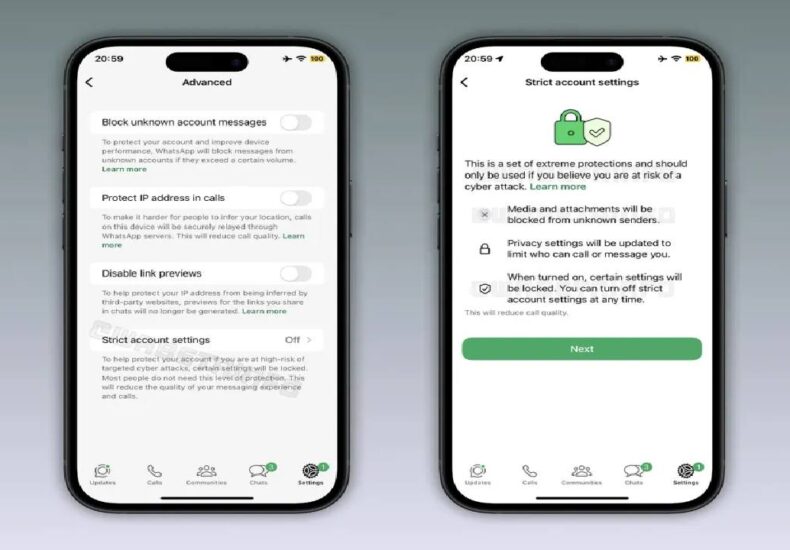
Six WhatsApp Security Settings That Can Help Protect Your Account From Hackers
Fundacion Rapala – WhatsApp has become an essential part of daily life for billions of people worldwide. From family conversations and work discussions to banking notifications and digital service alerts, much of our personal information now passes through the messaging platform. As a result, WhatsApp accounts have become increasingly attractive targets for hackers, scammers, and cybercriminals. While many users assume that protecting an account requires advanced technical knowledge, the reality is often much simpler. WhatsApp already provides several built-in security features that can dramatically reduce the risk of unauthorized access. Unfortunately, many users never activate them. In an era where digital privacy is more important than ever, taking a few minutes to strengthen account security can prevent serious problems later. Understanding and using these settings is one of the easiest ways to protect personal information online.
Two-Step Verification Creates an Extra Layer of Protection
One of the most important security features available on WhatsApp is Two-Step Verification. This setting adds a six-digit PIN that must be entered whenever the account is registered on a new device. Normally, a hacker who gains access to a verification code might be able to take over an account. However, the additional PIN creates a second barrier that makes unauthorized access much more difficult. Setting up the feature takes only a few minutes and can significantly improve account security. Users can also add an email address to help recover the PIN if it is forgotten. Cybersecurity experts consistently recommend enabling two-factor authentication whenever possible because it reduces many common attack methods. In the case of WhatsApp, Two-Step Verification remains one of the most effective defenses against account hijacking.
Read More : A Ghost Town That Hides Invisible Poison: Thousands
App Lock Prevents Unauthorized Access to Conversations
Even when an account is secure, physical access to a smartphone can create privacy risks. Family members, coworkers, or strangers may sometimes gain temporary access to a device. To address this concern, WhatsApp offers an App Lock feature that requires fingerprint recognition or facial authentication before opening the application. This additional safeguard protects private conversations from being viewed without permission. Many users underestimate the importance of this feature because they focus primarily on online threats. However, personal privacy can be compromised just as easily through physical access. App Lock helps ensure that messages, photos, and sensitive information remain protected. In a world where smartphones contain significant portions of our personal lives, adding biometric protection to messaging applications has become an increasingly important security practice.
Controlling Online Visibility Reduces Privacy Risks
Many people do not realize how much information they share simply by appearing online. Features such as “Last Seen” and “Online” status can reveal activity patterns that others may misuse. While these settings seem harmless, they can allow strangers or unwanted contacts to monitor behavior over time. Fortunately, WhatsApp gives users the ability to control who can view this information. By limiting visibility to trusted contacts or hiding status indicators completely, users gain greater control over their digital presence. This small adjustment can improve privacy and reduce unwanted attention. In today’s connected world, managing personal information extends beyond passwords and security codes. It also involves deciding what others can see about daily habits and online activity. Privacy settings play an important role in that process.
Read More : Deadly Coal Mine Explosion in China Raises Fresh Questions
Regular Security Reviews Help Prevent Future Problems
Cybersecurity is not a one-time task. Instead, it requires ongoing attention and regular reviews. Many users activate security features once and never revisit their settings. However, digital threats evolve constantly, making periodic security checks increasingly valuable. Reviewing connected devices, login activity, and privacy preferences can help identify potential risks before they become serious problems. WhatsApp allows users to monitor linked devices and remove any unfamiliar connections. This simple habit can quickly reveal unauthorized access attempts. Additionally, reviewing account information ensures that recovery email addresses and security settings remain accurate. Just as people regularly maintain their homes or vehicles, digital accounts benefit from routine maintenance. Small preventive actions often provide the strongest protection against future security incidents.
Strong Privacy Settings Protect More Than Messages
When people think about WhatsApp security, they often focus exclusively on chat messages. However, privacy settings affect much more than conversations. Profile photos, status updates, group memberships, and personal information can all reveal details about a user’s life. Cybercriminals sometimes use these details to build profiles for phishing attacks or social engineering scams. WhatsApp provides tools that allow users to restrict who can view this information. Limiting visibility to trusted contacts reduces opportunities for misuse. These settings also help prevent strangers from gathering unnecessary personal details. As digital communication becomes more integrated into everyday life, protecting personal information requires a broader approach. Effective security involves managing every aspect of an online presence, not just the messages being exchanged.
Awareness Remains the Strongest Security Tool
Technology can provide powerful protection, but user awareness remains equally important. Many successful scams occur not because security systems fail but because users unknowingly share sensitive information. Fraudulent messages, fake verification requests, and impersonation attempts continue to target WhatsApp users worldwide. Therefore, understanding common scam tactics is essential. Users should never share verification codes, PINs, or passwords with anyone, even if the request appears legitimate. In addition, suspicious links should always be treated with caution. Security features work best when combined with informed decision-making. Digital safety is ultimately a combination of technology and awareness. By staying informed and using WhatsApp’s built-in protections, users can significantly reduce the risk of becoming victims of hacking attempts or online fraud.
Small Security Changes Can Make a Big Difference
Many people delay improving account security because they assume the process will be complicated. In reality, most WhatsApp security features can be activated within minutes. Two-Step Verification, App Lock, privacy controls, and regular account reviews require little effort yet provide meaningful protection. These small adjustments create multiple layers of defense that make unauthorized access far more difficult. As cyber threats continue to evolve, proactive security habits become increasingly valuable. Every user stores something important within WhatsApp, whether personal memories, family conversations, or professional communications. Protecting that information should be considered a basic part of responsible digital citizenship. By taking advantage of the tools already available, users can enjoy greater peace of mind while communicating safely in an increasingly connected world.